

HubSpot Deal Progression: Fix Your Pipeline First
HubSpot’s sales AI can now sit in on a meeting, write up what happened, update your deal and draft the follow-up. You approve with a click. That’s the pitch of Deal Progression, and for teams drowning in CRM admin it’s a real relief.
It also comes with a condition: it only works as well as your pipeline is defined. This post is part of our HubSpot UNBOUND 2026 coverage.
What Is HubSpot Deal Progression?
Deal Progression is HubSpot’s AI for keeping deals current.
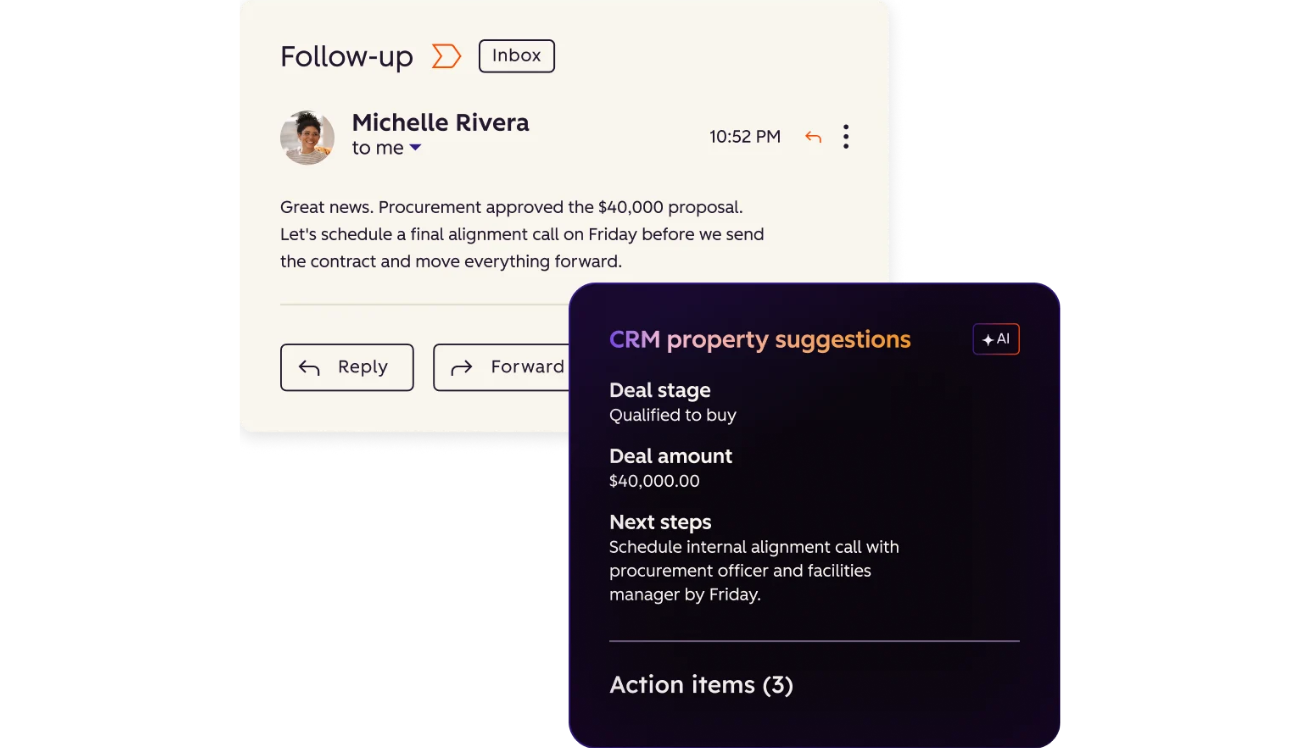
HubSpot’s own product page describes it simply: it monitors every email, call and meeting in real time, parses that activity against deal context, and surfaces prioritized next-best actions, drafted follow-up replies and recommended CRM property updates for a rep to review and apply with one click.
At the Fall 2026 Spotlight, HubSpot added a new capture layer on top: its Mobile Notetaker, which records calls and in-person conversations in real time, so Deal Progression has a transcript to work from even outside a scheduled video call.
In short: it turns conversations, and email activity, into CRM updates so reps don’t have to type them.
From Spring to Fall: How HubSpot’s Sales AI Evolved
This didn’t start at UNBOUND. HubSpot has been building the same chain all year:
- April 14: Smart Deal Progression debuts, and the Prospecting Agent gets rebuilt, at the Spring 2026 Spotlight.
- June 18: Revenue Hub is introduced.
- July 23: Agent Hub and Agent Builder launch in public beta.
- September 16: Deal Progression is revamped, the Mobile Notetaker arrives, and the Prospecting Agent is updated to watch more than 40 buying signals and assemble a buying group.
Read together, it’s a chain: find the right accounts, draft outreach, capture the conversation, update the deal, generate the quote. The CRM is the shared memory holding it all together.
What a Self-Updating CRM Actually Updates
HubSpot’s new Smart CRM captures calls, emails and meetings automatically. Recaps of the keynote describe it creating contacts, updating deal stages and laying out next steps, with every AI change visible and editable. Deal Progression sits on top of that: suggestions drawn from the conversation and inbox activity, approved by a rep.
In practice, that means contact and company records get created and enriched without anyone typing. Deal properties get updated after calls. Follow-up drafts appear ready to send. And a rep’s time shifts from typing to reviewing.
HubSpot has published one customer quote, without a named attribution, on its own Fall 2026 Press Center page: “We’re approving about 73% of what HubSpot’s Deal Progression suggests, and next steps are fully automated.” Read that number both ways. It’s a strong hit rate. It also means roughly a quarter of suggestions get changed or rejected. Someone has to know which ones.
Why Stages and Properties Decide Whether the AI Gets It Right
Deal Progression proposes updates in the language of your pipeline: your stages, your properties, your next-step fields. If those are clear, the suggestions are useful. If they aren’t, the AI has to guess what “Proposal” means at your company, and the guess gets approved at speed.
The usual failure modes:
- Stages that describe activity (“Follow-up”) instead of buyer progress. The AI can’t tell when a deal has actually advanced.
- No exit criteria. Nothing says what must be true to move to the next stage.
- Overlapping properties. Three fields for “budget,” and the AI picks one.
- Optional fields that are effectively required. Data the forecast depends on, but nothing enforces it.
Then there’s what happens after you approve. A stage change in HubSpot isn’t just a label. It can fire workflows: notifications, tasks, sequences, forecast rollups. An AI-suggested stage change triggers them exactly like a human one. If a workflow is wrong, agents now run it faster.
AI Prospecting for Relationship-Led, Long-Cycle Sales
The updated Prospecting Agent watches more than 40 buying signals, assembles buying groups and drafts personalized outreach. For firms that sell high-value services on long, relationship-driven cycles, such as consulting, advisory and professional services, the buying-group part is the interesting bit. Those deals have several stakeholders, and the CRM usually knows about one.
The caution: signals and drafts help most when your ICP is clearly defined. A prospecting agent pointed at a vague ICP produces polished outreach to the wrong people. Define who you actually sell to first, and put it in the portal where the agent can read it. That’s what Context Home is for, and we cover it in HubSpot Context Home: Is Your CRM Ready for AI?
What to Define Before You Turn On Sales Agents
- Stage definitions and exit criteria. One sentence per stage about what the buyer has done, not what the rep has done.
- Required properties per stage. What data must exist before a deal can advance.
- Deal ownership rules. Who owns the deal, and who approves AI changes.
- Workflows tied to stages. List everything that fires when a stage changes.
- Autonomy level. Start with suggestions a rep reviews. Dial up only as approval rates and accuracy hold.
If defining this reveals a pipeline nobody follows, that’s the finding. Better to learn it now than after an agent has been updating it for a quarter.
If you’re setting up HubSpot, or rebuilding the sales process behind it, that’s the work we do in HubSpot Implementation. We break down what a build costs in How Much Does HubSpot Implementation Cost in 2026?
If you already run HubSpot and suspect the pipeline has drifted, a HubSpot Audit is the faster route.
Not sure your pipeline is ready for this? Book a free consultation and we’ll look at it together.

Manyflow
Alineamos, automatizamos, y aceleramos tus operaciones de Marketing, Ventas y Soporte a través de soluciones de C.R.M.
Leave a Reply